Friday, July 27, 2018

Modification to allow use of ASR 33 paper tape reader with PDP 8 clone (SBC 6120)

VINTAGE COMPUTER FESTIVAL EXHIBITION PREPARATION

I was exchanging emails with a DEC computer collector and mentioned that the SBC 6120 didn't have the signal output to switch the Reader Run Control relay board in the ASR 33. Without the signal, the motor of the punch tape reader runs at full 110 baud speed which is too fast for programs in a DEC minicomputer to keep up.

To avoid overruns, the serial board in the PDP 8 will switch on and off a signal driven by software. The software is interrupted when the serial board has received a character into its buffer and can interrogate a flag indicating the data is ready for transfer. A program will fetch the character and then issue a command to reset the flag.

When the flag is on, the Reader Run Control relay is switched off pausing the paper tape reader motor. After the software clears the flag, the relay turns back on and the paper tape reader advances to the next character.

I looked over the schematic of the SBC 6120 and examined the data sheet of the Harris 6402 UART chip it uses for serial data. The clone uses the Data Ready pin from the 6402 as the flag that is visible to software, and the command to clear the flag toggles the Data Ready Reset pin.

Pins 18 and 19 of the Harris 6402 chip

Schematic portion with 6402 UART chip wiring
Thus, I can tack a wire on the 6402 to watch the Data Ready signal, invert its state and convert to an RS 232 level signal to drive the relay coil of the Reader Run Control board inside the teletype. I will have to scramble to build the circuitry and do the modifications, then test this to see if I can successfully read in programs from paper tape when running on the SBC 6120. 


Monday, July 23, 2018

Fixed SBC6120, made duplicate paper tapes, and know cause of linefeed issue on ASR 33 teletype

VINTAGE COMPUTER FESTIVAL EXHIBITION PREPARATION

I hooked up the Altairduino to the teletype and successfully brought up 4K Basic, loaded a program to print prime numbers from paper tape, typed RUN and saw it run correctly. Still no linefeed function but otherwise it works well.

I switched over to the PDP-8 clone (SBC 6120) but didn't have good results. The output on the teletype was garbled and the machine itself was balky. I opened up to see what was wrong and quickly discovered a loose wire to my UART configuration switch.

I do get some oddly garbled initial text from the SBC 6120 itself, but the output from OS/8 itself is good. I did some testing, including booting OS/8, loading PFOCAL and running the focal program HANOI to play Towers of Hanoi. All looks good here.

I did a test to see if the SBC 6120, as a realistic clone of a PDP-8, would suffer from the same problem reading in paper tape. On a real PDP-8, the IO card buffer gets overrun by the incoming characters from paper tape. To resolve this, the PDP-8 has a modification for the ASR 33 which starts and stops the tape reader motor under program control.

Alas, this requires access to the control signals from the PDP-8 IO card, but all that is available on the SBC 6120 is RX and TX lines. Therefore, I see no way to control the teletype paper tape speed to avoid the buffer overrun problem. My demonstrations with the PDP-8 clone won't use paper tape input. 

I chose to punch a second set of tapes for the two longer programs, Hangman and TicTacToe4K, because they don't depend on the linefeed function which is not working yet. I completed these, which gives me two good tapes per demo program. I can always punch more at VCF if that is needed.

To produce the additional copies, I put the ASR 33 in Local mode, stuck the existing tape in the reader and pushed On for the paper tape punch. Once I turned the tape reader lever to Start, it was reading and copying the input tape onto the output tape. 

ASR 33 TELETYPE REPAIR

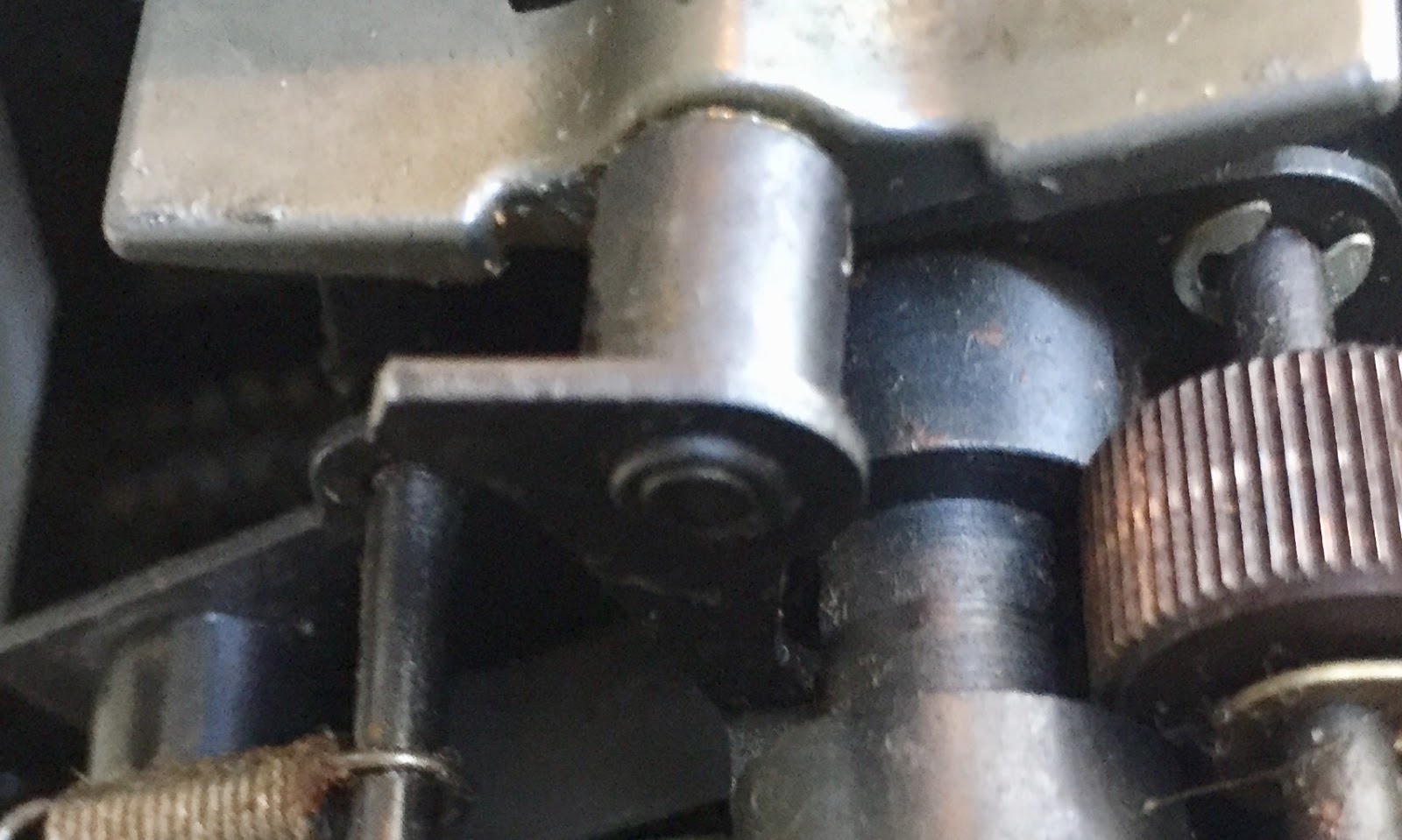
The problem I faced today was failure of the printer to advance when the LineFeed button or received character is present. I can make it work if I partially depress the feed pawl, thus I will be looking for missing or broken parts. I had to remove the cover of the machine to see into the mechanism and begin the debugging.

I opened up and began inspecting. Nothing appeared missing or damaged, although I did notice some flaking remnants of plastic of some type on a bracket associated with Line Feed. I pulled off the little chunk that was left and looked to see if a bigger piece had fallen into the mechanism and jammed something. Nothing obvious here. The diagram I had describing the workings of the line feed function didn't show the item in question.

Wonders of the internet! Somebody had the exact same issues as me, and their description pointed to a bit of plastic that must be in place for Line Feed to work. http://www.foxdata.com/blog/line-feed-not-working/ is where I found the writeup. This exactly matched my situation.

When I am through with VCF West, I will be visiting RTTY Electronics, Paul Cembura, for parts for the model 15 and also for the correct bit for this machine. In the meantime, I will fabricate some workaround just as he did. I will be guessing about the offset necessary, but hopefully it is not too critical. My first three tries were off, the last unfortunately lead to LF after every printed character.

I then put in an hour poring over the parts list for the model 33, trying to find the plastic part or even the parts near it, all to no avail. Since there are two other model 33 teletypes at Marc's home, there should be a part he can grab and model a replacement on. I do have a week and a half to search the parts list hoping to locate the official part number. 

Sunday, July 22, 2018

BaudotRSS program fixed and ready to drive model 15; paper tapes punched to drive ASR 33 demos

VINTAGE COMPUTER FESTIVAL EXHIBITION PREPARATION

I wired up a USB link to true RS232 to allow me to directly drive the ASR 33 from the PC, with the intent of producing punched tapes for the upcoming demonstrations at VCF. With this working properly, I attached to the teletype and ran a terminal program which read a text file and sent each line to the teletype for punching.

First to run was a short basic program Prime to list prime numbers. It punched well and seemed to read back just fine. The extremely old paper tape I have on the machine is challenging to force into the punch. I spent some time fighting with the tape and punch until I was ready to punch out the other demo tapes.

Next up was Hangman, a relatively long program. I spent a miserable 20 minutes with the punch repeatedly stopping halfway through the program when the shoddy quality tape that I have on the machine would jam. Each time, I have to rethread the tape and start over. I took a mental health break.

I then remembered that I had bought some paper tape rolls many years ago when I was building a paper tape punch for my IBM 1130 replica. I found the box and grabbed one of the rolls. I threaded it into the ASR 33 and was back in business. I punched out Hangman, TicTacToe4K and another copy of the Prime program.

I did have to hold the spool of blank tape and feed it out in a loop, since there seems to be too much drag when the roll is sitting in the teletype feed slot. I will look into this later, perhaps it just requires some cleaning and waxing of the surfaces to reduce friction.

Hangman, TicTacToe4K and Prime programs on paper tape
The old paper in the teletype is as bad as the paper tape stock - frequently jamming up and blocking the line feed from advancing the paper. I did buy some new paper rolls, but also plan to unroll the old paper. It is two copy paper, although whatever chemical was intended to act as carbon paper has long since evaporated.

I unspooled the entire roll onto the floor and then rolled up each of the two copies separately to produce two 'new' rolls. If these feed well enough as single copies, they are preferable to use at the show. They are the standard teletype light yellow color and the top copy has Western Union Telex printed along the left edge for extra authenticity.

Unspooled two ply paper roll
After a wonderful half hour spent separating and rolling up the outer ply, I had one roll of WU Telex paper ready to install in the machine. I got it lined up and discovered that somehow my line feed (LF) had stopped working. The printer won't advance the paper when an LF arrives!

Now I have something broken to repair again. Very disheartening. I have family obligations which will keep me from doing any work from the 24th to the 31st of this month. With VCF West loading on the afternoon of August 3rd, I only have three full and one partial day left to deal with this.

Bummed out and having a huge pile of paper on the den floor, I had to roll up the second play to make into a usable paper roll. That took about 30 minutes and took my mind off the treachery of the ASR 33 printer.

Second ply in a heap on the floor
The problem with the line feed seems to be something up on the left side of the platen. I suspect that a spring was dislodged by the crappy two-ply paper which was jamming up earlier, or a part broke. The feed pawl (see below) doesn't move when a LF is commanded, but if I push the pawl down a bit there is a zone where it will reliably jump and pull the platen one line up.

Line Feed mechanism
The feed pawl seems to snap back up, so I can rule out loss of its spring. I will be looking at the line feed linkage in more detail, after I remove the covers from the unit. This will have to wait until tomorrow. 

I had some problems with conflicting Python versions on my laptop, which affected the BaudotRSS program which will drive my model 15 teletype. I did a clean install of Python 2.7 on a desktop machine I use for amateur radio and HP 1000 disk emulation, installing all the packages needed by the program.

Everything appears to work perfectly, based on log output and the blinking lights on my teletype interface box. Before VCF West I will have to bring the entire desktop PC over to the model 15, or bring the model 15 over here, and run a final test.

I took some acrylic square rods and glued them to the SBC 6120 panel to fit it to the wooden box I recently bought. This provides a nice case for use during VCF West.

PDP-8 clone

Friday, July 20, 2018

My model 15 teletype working great, plus prep for VCF West exhibition

VINTAGE COMPUTER FESTIVAL EXHIBITION PREPARATION

I updated the configuration file for the BaudotRSS program that will drive the model 15 teletype at the festival. It will allow us to print news or weather reports, producing that wonderful newsroom sound and some output that can be handed to attendees.

The program was set up by default to assume that the teletype does a linefeed after every carriage return, but that is not true of our model 15s. I changed the code to interject a LF after each return. The other change was to specify weather reports for Mountain View where the festival takes place, and add some interesting news sources to print. 

I moved my ASR 33 into the garage, mounted it on its stand and loaded blank paper tape in preparation for punching out the demo programs. I couldn't figure out how to punch leader - an ASCII null character - since there was no visible key on the keyboard for it.

I decided that I could switch to Line mode with nothing wired up, which causes the machine to see a continual stream of null characters and thus punch them as leader. Now I am ready to punch my demo tapes, hooking my PC to the teletype with a USB to serial connector and MAX3232 voltage converter.

I bought a wooden cabinet that was a reasonable fit, although not perfect, for the SBC 6120 computer. Acrylic blocks glued to the rear of the computer front panel will hold it in place in the opening of the box and allow the power cord and RS232 cables to run out the bottom.

Bob Rosenbloom will be bringing in a non-working ASR 33 mechanism to set on the desktop to let people look inside and see how the machine is constructed.

MODEL 15 TELETYPE RESTORATIONS

This morning I identified some areas that might be causing the failure of the ribbon of my model 15 to advance properly. The first thing I spotted in the diagrams was a 'ribbon lockout lever' which is probably activated. Sigh.

After arriving at Marc's I spent time on two aspects of my teletype, the ribbon mechanism and the selector mechanism. Typing does not show up on the paper and the ribbon does not advance. The selector vanes move a bit sluggishly, vane five is not deflecting to its end positions and there are erratic mistyping results of the vanes not following the input data stream.

First up, I lubricated and exercised the selector mechanism and vanes until they felt free and didn't appear to stick at all. Then I was ready to hook up the teletype to my computer interface box and begin some testing. That is, after I attended to the nonfunctioning ribbon.

I looked closely at the printer. Yes, indeedy, my ribbon lock lever was set. I unlocked the mechanism and then turned on the teletype and interface. After a bit of adjustment of the 'range finder' which determines the spot during each bit cell that the condition is sensed, my machine began to type flawlessly.

Alas, the ribbon was not winding, but it is at least printing nicely when I manually shift the ribbon a bit. Once I attend to this last part of the task, this model 15 will be ready for its role printing at VCF West.

I tried out the weather forecast mode and indeed it printed the forecast for Mountain View, California, the site of the festival. Once I have the ribbon advance working properly I can try out the newsfeed mechanism.
Weather report printed on old paper
After quite a bit of lubrication and a good 30 minutes of turning of the most stucky of the ribbon reel gears, I got everything freed up and looking good. The machine was reassembled and went right into service, typing flawlessly with the new ribbon and new paper.

Model 15 as it will sit at VCF West
Something is not right about the newsfeed option - presumably this will print the top stories from selected RSS feeds - since the program complained that there were no new stories. Ken Shirriff helped investigate the malfunction and it appears that the way I have Python 2.7 and Python 3 installed on my laptop is causing some conflicts and impacting the program execution.

I plan to install just Python 2.7 on a desktop computer I own, giving a pure environment for the BaudotRSS program. If that seems to work without a teletype attached, I can do a final verification at Marc's house the next time I am there. 

Thursday, July 19, 2018

Finished repair of ASR 33 punch, worked on model 15s, and prepared for exhibition at VCF West

ASR 33 TELETYPE RESTORATION

Wednesday night, the eBay perforator arrived and I disassembled it to have the replacement parts for my ASR 33 tape punch. This arm with the teeth has a spring that attaches - the choice of tooth determines the tension on the paper tape as the punch operates.

The part that will replace my broken one
The part after removal from the spare perforator
I removed the broken part from the ASR 33 perforator and slid on the replacement part. The last step in restoring this unit was completed when I used a spring hook to pull the spring up and fasten it on one of the teeth.

Broken arm on the ASR 33 perforator, before removal and replacement
The new arm is in place now and I can begin to punch tapes necessary for the exhibition at VCF West. 

MODEL 15 TELETYPE RESTORATIONS

After studying the manuals and thinking about the symptoms of my model 15 (printer doesn't move print or function bails), I have zeroed in on the section I believe is frozen in place and needs some work.

Most likely mechanism causing symptoms - Clutch Throwout Lever and Stop Arm
There is a lever which rotates to engage and stop the clutch for the two cams which drive the print and function bail movements. A cam on the selector mechanism pushes the Cam Arm, causing the Clutch Throwout Lever to rotate on its axis, allowing the spring to push the clutch teeth together. This rotates the two cams that push the bails.

I confirmed that the driving clutch member is not sliding on the main axle and meshing. It took 90 minutes of manipulation of the newly oiled member before it would slide into mesh and pop back crisply. Hundreds of movements of the member, using a screwdriver as a prybar with gradually lighter pressure once it began to behave properly.

I took the carriage assembly off to work on the main shaft and other linkages. When I reinstalled it, I somehow pinched the strap that pulls the carrier back to the left. This strap is wrapped around a circular spring assembly and its other end is clipped to the right side of the carrier.

Marc repaired it, making a slightly shorter strap by opening the clamped metal, looping the remaining strap through the end hook and reclamping. It was installed and I once again have carrier return on the printer.

I hand rotated the main shaft and set up various baudot code patterns on the vanes. For example, I set them to SPACE, SPACE, SPACE, MARK, SPACE which is a CR command, then watched the mechanism trigger the return and it complete successfully.

I then triggered LF and verified the platen advanced one line. I triggered 'Space' and saw the carrier move one column to the right. Figures and Letters caused the entire platen to move up and down so the selected half of the typebar will strike the platen.

The computer interface then drove a pattern of alternating R and Y characters, a classic pattern used to adjust teletype reception. The results weren't perfect, although I had a decent number of R and Y strikes, there were plenty of miss-selected characters. I shot some slow motion video to examine further. It appears I have a slow vane number 5, sometimes settling in an intermediate position between MARK and SPACE - which is invalid.

I put a new ribbon on the printer but something is wrong with the ribbon advance mechanism as it isn't moving. I will review the documentation and then work on my model 15 some more tomorrow morning.

Marc worked a bit on the "Bob Erickson" model 15. First up was the need to adjust the speed to 45.45 baud, since this particular printer uses a governor to control motor speed. He hooked up an oscilloscope to the keyboard circuit, drove it with a power supply, and watched as he typed various characters on the keyboard.

He adjusted the motor speed until the bit cells took up exactly 22 ms. We then connected the computer interface and printed various patterns until it was working perfectly. When the interface listed its menu of choices, such as news stories or weather reports, we tried to select a choice by pressing a key.

The computer interface registered the wrong character - when Marc pushed W the interface saw a Z. A quick check with the oscilloscope confirmed that the keyboard is not encoding correctly. The contacts were quite dirty. After time spent cleaning the contacts and checking the results, we had the keyboard working well.

Unfortunately, I we ran out of time and couldn't continue with the computer interface testing. Next session, we plan to hook the keyboard and printer in a local loop, exercise the Erickson machine and hopefully have it ready to use at VCF if I can't get my unit working in time.

PREPARATION FOR VCF WEST EXHIBITION OF TELETYPES

With my paper tape punch working correctly, I hooked up the USB to serial module through the MAX3232 board to drive the teletype. Using a terminal program that will feed text files to the teletype, I simultaneously listed and punched a few basic programs to use as demonstrations at the festival. These will work with the Altair 8800 clone.

I am sketching out ideas for scripts to use at the festival, allowing my helpers to give the same experience when I am not at the booth. These are essentially all examples of booting 4K Micro-Soft basic and loading the paper tape for a particular game or demo. In most cases, the attendees can interact with the programs using the teletype.

I have Adventure somewhere on the PDP 8 clone, along with OS/8, so I just need to script out the startup procedures and give them some aids to help attendees get through some early challenges in the game.

I also need to script out the method of switching the teletype between the two clone computers - it is pretty straightforward but worth documenting just in case. There is no such switching necessary for the model 15 teletype and its connection to a PC, although I will script how to restart the BaudotRSS program if something goes wrong.

For the model 15 demo, I did some experimenting to find interesting RSS feeds that could be printed. I will test this tomorrow; hopefully having something interesting to type out. 

Tuesday, July 17, 2018

Cosmetic items added to ASR 33 and some work done on model 15 teletype

ASR 33 TELETYPE RESTORATION

Today I drove up to visit RTTY Electronics, the world's largest business providing teletype parts, service and refurbished machines. I picked up the missing pieces for my ASR 33:
  • Local/Off/Line switch knob
  • Platen knob
  • Faceplate (Teletype logo)
All parts now installed, plus I have a spare rubber cap for the hammer that slams the type wheel against the paper.

The remaining part I need to finish the restoration is the 'arm with bushing' that snapped off. This part is used to adjust the spring tension that is applied to drive paper tape through the punch. I bought a spare perforator on eBay but won't have that until Thursday. 

MODEL 15 TELETYPE RESTORATION

I visited Marc's basement today for a short time and reinstalled the functional bail rod and related mechanisms into my printer. After making adjustments per the Teletype manual, it was time to remount the type carriage and make some tests. 

Hand rotating the mechanism while manipulating the state of the selector magnet armature allowed me to key in various codes, to verify whether each appears to work properly before running the machine under motor power. I tried these codes:

  • 01110 to encode the letter C
  • 01000 to encode a line feed
  • 00010 to encode a carrier return
  • 00100 to encode a space
  • 00000 to encode a chatter null

I did indeed fix the spacing clutch, so the carrier stays at its current position. What I discovered is that my main clutch that should be moving the function and print bails back and forth is not engaging. That means no printing, no chatter, no functions, just a quietly turning main shaft and the vanes trying to select characters based on the incoming code. 

Sunday, July 15, 2018

Modified SBC 6120 to work correctly with ASR 33 teletype, as well as tested Altairduino to TTY link

PREPARATION FOR VCF WEST EXHIBITION OF TELETYPES

My replacement MAX3232 board arrived and I wired it up to allow me to connect it to either the Cypress 2102 based USB to serial module or the Altairduino serial port, This board features a male DB9 on the end, for connection to my cable, Telebyte and teletype. Fortunately, both the USB to serial module and the Altairduino will be properly configured for 110 baud with the proper character size and stop bit values. 

I constructed a cable from DB9 to DB25 to carry the true RS232 signals to the Telebyte 65 converter which drives 20ma current loops to and from the ASR 33. All I have to do is plug in a male DB9 to this cable and it will drive the teletype correctly when set to 110 baud, 7 bit, even parity and 2 stop bits.

The SBC 6120 computer has a male DB9 and is transmitting at 111.6 baud, but not yet with the proper configuration e.g. it currently emits 1 stop bit. I plan to modify the machine to work properly.

I discovered that this PDP 8 clone computer uses the Harris HD6402 UART chip which allows for selection of the serial format including stop bits. That means I can adjust the chip by bending out some pins and tacking them to +5 or ground to set up the configuration of the console serial port.

I first experimented with the USB to serial module to see the effect of various choices in serial port configuration, to determine what control bit setting to attain with the Harris UART. Next up, I modified the computer to operate with those settings, then gave it a try with the teletype.

The UART does not support MARK parity, which means that I need to use an data=7 to substitute the last bit for parity and then select parity=EVEN to lead me directly into stop=2. The teletype will see a start bit, 7 character bits, even parity and 2 stop bits.

That last character should always be MARK but I can't insure that. Since the teletype is not a smart device, it should not react to the incorrect parity bit. I used the USB to serial configured as 300-7-E-2 but the modification to the Cypress 2102 chip on the module causes it to actually run as 110-7-E-2 which is what I wanted.

I was able to send long strings of text, faster than the teletype can print, which showed up perfectly. The input from the ASR 33 keyboard shows up faithfully on the PUTTY screen. That tells me that this setting should work fine for the SBC 6120 as well.

I hooked up my new MAX2232 to the Altairduino and plugged the MAX into the connector for my teletype. Everything worked great. I put the computer into configuration mode, which prints a long menu of options, and it all came out flawlessly.

Altairduino configuration menu
The only problem I had is an inherent problem of the Altairduino code - the command for setting the serial port is 's' and the command to save a configuration is 'S'. Since ASR 33 only produces upper case letters, my keystroke asked to save a configuration when I had hoped to list out the serial port parameters.

The Altairduino is configured as 110-7-E-2 and works fine with the teletype. The reason that I had garbage typed but correct response with the unmodified SBC 6120 chip was that an incoming character of 7-M-2 simply appears to be a 8-N-1 character or a 7-N-1 with an idle interval before the next start bit.

The incoming characters to the printer are sent 8-N-1 and that means the next start bit arrives while the Teletype is still expecting a second stop bit. This gets the bit stream out of sync and causes garbage to type interspersed with some strings that accidentally line up properly.

The Harris 6204 UART chip has five pins that configure the serial port - CLS1, CLS2, PI, EPE and SBS. The normal mode for the SBC6120 sets these to request 1 start bit, 8 data bits, no parity and 1 stop bit. To work with my teletype, I need to have it set to 1 start bit, 7 data bits, even parity and 2 stop bits.
Harris UART chip at bottom
The only signals that switch value between normal and ASR 33 settings as CLS1 (pin 38), PI (pin 35) and SBS (pin 36). The PCB has CLS1 and PI wired to VCC and SBS wired to ground. To change this around, I need to bend those three pins outward so they don't fit into the socket, then tack on wires allowing me to connect them differently.

Pins 35, 36 and 38 bent outwards to isolate them from PCB
I can do a quick and dirty, wiring CLS1 and PI to ground, SBS to VCC, which permanently sets the SBC6120 to teletype mode. However, without too much extra work, I can add a miniature DPDT switch. This will allow me to switch between normal and teletype mode at the flick of a switch.

CLS1 and PI signals on blue wire, SBS signal on white wire
I popped the chip, bent the pins, tacked on the wires and soldered together the DPDT switch this evening. I put the switch into the 'teletype' mode and stuck the unit back into its case. It was late but I went out to perform the final test that night (the ASR 33 is in my car trunk and I test with an outdoor table behind the car).

Everything worked great! The SBC 6120 booted OS/8 and I did a directory listing. The paper ripped a bit and messed up the line feed in a couple of places but the ASR 33 is working great. 

PDP 8 clone running OS/8 doing directory listing on ASR 33
The model 33 related hardware for the VCF West exhibition is set now. I will script out a few demos for both the Altair clone and PDP 8 clone, including paper tape input. I still need to test whether the teletype reader will overrun either of the clones; if they do, I won't be able to run an all out paper tape demonstration.