Sunday, August 13, 2017

Disk emulator testing and further design

ALTO DISK EMULATOR TOOL

The disk emulator is now spinning up virtually when an image is downloaded to its RAM and the command is issued to turn on the drive. It goes ready and should be producing sector marks, rotating sectors at the proper rate and otherwise acting right. I hooked up the scope and did some initial testing.

The emulator was behaving correctly - all the signals I monitored did what they should. Sector marks arrived every 3.33 ms, with the sector number cycling between 0 and 11. The drive showed it was ready to seek, read or write.

I pulled a wire to cause the Strobe signal to go active, but with a cylinder request of 255 which is invalid. As expected the logic responded with a Logical Address Interlock condition since only values between 0 and 201 are valid for seeks.

I will set up the logic analyzer allowing me to check the timing of all the signals involved in a seek. Too, I have to see that all the lines respond as they should.

TEKTRONIX 7854 SCOPE REPAIR

I popped open the scope and discovered that I had a wire loose. Soon fixed and my horizontal scan is back in operation. Unfortunately, still have the interference between the digital and the analog sections, causing dashes across signal traces and smearing sideways of digital characters.

Hmmm, guess there is something else to find and repair but I was close. The chip I replaced is indeed the switcher that determines whether the CRT horizontal plate amplifiers are driven by the digital or the analog side. I am seeing mixing of both - digital signals on screen at the time of the analog sweeps and analog signals interfering with digital signals.

Since my switching chip was blown out, but now works properly, I have to assume that the event that caused its failure also took out one or more other components in attached circuits. Time to study the schematics and look for candidates to investigate. 

Friday, August 11, 2017

Building disk emulator functionality to replace disk drive on Alto

ALTO DISK TOOL

Given the disk crash we had on our spare drive, which we anticipate is repairable with sufficient cleaning of the heads, and a crash that another Alto owner suffered last week, I decided to move forward with the disk emulator version. This version will attach to an Alto disk controller card and respond as if a real Diablo drive and cartridge were present.

I had worked out some of the logic simply to test the disk driver version and thought through most of the functionality in the past. I will fork off a version of the tool and begin logic development. In addition to different logic loaded into the fpga, it needs an alternate plug-in board that routes signals through output drivers and input level shifters.

The emulator board will require a female connector to which the disk controller cable will attach, but will implement terminators on board rather than requiring a specific connector for an external one.

It will drive 11 output lines and shift 15 input lines from the TTL voltages of the Alto to the 3.3V of the fpga board. By comparison the existing driver board implements 15 outputs and shifts 12 inputs.

The difference in counts, otherwise symmetric, is due to the elimination of the Erase Gate input signal for the emulator. Since we know that an Alto ties Write Gate and Erase Gate together, whenever we see the Write Gate line we know the value of and needn't sense Erase Gate.

Before I did anything, I backed up the current state of the Disk Tool project. I then found a way to copy it to a new project, the disk emulator. Only when I knew that changes to the emulator won't impact the disk tool at all, was I ready to begin writing VHDL.

I built a couple of the emulator boards assigning fpga pins as input or output, using the level shifter or driver chips and routing it to the appropriate pin of the connector that will hook to the Alto disk controller cable.

The logic is interesting working this way. Essentially I will have a continuously running process that "spins" the disk producing SectorMark, another that runs continuously to produce the clock and data bits for each sector as it passes under the virtual disk head. The outputs ReadClock and ReadData are gated by the ReadGate signal but otherwise being continually generated by the reading process.

Only when the WriteGate signal is activated will I block the reading of words from memory, decode the WriteData&Clock signal to form words and stick them away. Not sure how to handle the writing side, likely another process synced with the continually reading process. This will be the only tricky part.

The Alto will be giving me padding words, sync words and other content while the WriteGate is on, thus I have to shadow the Alto to know which are data words for the header, label and data records in the sector.

Thursday, August 10, 2017

Replaced my horizontal switching chip in Tek 7854, still not working (but different)

TEKTRONIX 7854 SCOPE REPAIR

The new IC is installed on the PCB but placing that back into the scope is more trouble than I expected. The board is small, very roughly about 2" x 6", and is inserted through a cutout behind one of the four plug-in sockets in the lower bay of the scope.

I noted where the six coaxial cables and one other connector are inserted, but the bigger issue is the 9 slender wire rods that must slide through holes in this board. Each is a rectangular copper wire about 3" high standing off the lower common board and onto which my board must slide to make its contacts.

With the holes about 1/64" in size and spread across the board, I have to finesse nine separate wire rods into the holes simultaneously before I can slide the board down to its final mounting position. The slightest bend or miss-positioning of one is enough to block the entire board from sliding.

Fortunately I can look from the underside to see how these nine rods are touching the PCB. Thus it is just barely possible that I can use tools to hold the rods in position, with the board slightly tilted, moving forward so that earlier rods stay in holes but new ones are maneuvered to their holes.

The layout is one hole in the upper right, three along the left side from mid to mostly top, the rest down low and to the right. They are not as aligned as it sounds, except for one group of 3 and another of 2. This will take very good lighting and lots of patience.

Thursday morning I set up the lighting and lined up my tools for the first attempt. Placing the board over the pins was not difficult once I had tools that could reach the pins individually. I placed all cables back as they were originally and buttoned up the scope.


Now that it is installed and cabled up, it is time to test this scope out. The key will be ability to use both left and right timebases to sweep across the screen and to view un-distorted characters from the digital section. 

Drat! Not only did this not fix the original problem, but now I have no horizontal defection at all in analog mode from either B plug in. The digital mode characters still shake. The one ray of light is that the horizontal mode switching now works properly, choosing the left or right B plug in and alternating or chopping.

Something more pernicious is happening here. The digital mode sweeps, thus my new chip is at least connecting the digital left and right signals to the horizontal defection amplifiers. The analog left and right signals do not appear to be switched, however.

I will need to do some scoping of these signals, I guess, to figure out what is happening. Working hypothesis is that additional failed components are affecting the scope, with a less likely but small chance that my replacement chip is failing too. Something is wrong but I will put this aside for now until I am ready for the more involved digging necessary.

Wednesday, August 9, 2017

Exhibited Alto at VCF West, finished reading U of M card decks

FINISHED READING CARD DECKS FOR UNIV OF MICHIGAN RESEARCHER

I used my setup to begin reading the remainder of the six boxes of card decks from research conducted in 1970 and punched from the MTS timesharing system at UofM. I had some balky behavior for a time until I corrected a loose connection and tightened the power supply wiring. 

Documation reader, interface electronics behind and PC capturing card images on right

ALTO EXHIBITION AND DEMONSTRATION AT VINTAGE COMPUTER FESTIVAL WEST

We brought the Alto to the Vintage Computer Festival West 2017 event at CHM over the past weekend. It took a few hours to load three cars, drive over, unload and set up in the festival exhibit area. Luck smiled on us - everything worked just fine for the two days of the show. 


Our Alto in our exhibit area, just before teardown at the end of the show
I was also committed to two panels to take place at the event. One concerned restoration of older equipment at the CHM, covering the 1620, PDP-1 and 1401 systems. The other was a presentation of our restoration of the Xerox Alto and a live demonstration. 

This did require us to haul the machine up onto stage and use a camera to show the screen image on the projector for viewing by the audience. We had a few gremlins interfere but overall it was a success. 

We also had the fortune to meet with and listen to the panel of original Xerox PARC researchers who went on after us. They shared stories of their time building and working with the Alto, plus answering audience questions. 

TEKTRONIX 7854 SCOPE RESTORATION

The custom IC that switches the horizontal signals and manages blanking during digital display intervals is now in my hand, having arrived from Rhodes a few days ago. Soon it will be back in the scope and I can check whether the problems went away.

Thursday, August 3, 2017

Dive into the Telex tape drives to assess the restoration work ahead, plus prep for VCF-West exhibit

TELEX 8020-266 TAPE DRIVE RESTORATION

I put some time into the documentation and exploration of the two frames I have. There are a few challenges ahead. The main one is that the model 266 is a dual frame unit, A and B, with one tape transport in each frame. However, the vacuum and air pressure for both transports are mounted in frame B, as is the main input power connector, while the integrated control unit is in frame A.

What I received is frame A but no frame B. No place to connect the power cable nor any supply of vacuum or air pressure. The second frame I have is a model 6 drive that fell off a forklift and has quite a bit of damage. This unit has a transport and a set of vacuum/pressure pumps for itself. It is NOT, however the B frame that is part of the model 266.

Therefore I have bought the typical "Pile-o-parts" and not a unit that would ever have worked as it was sold to me. The damaged model 6 frame was obvious but the lack of the essential B frame for the purportedly working model 266 is a challenge.

I believe I can cannibalize the vacuum and air pressure unit from the damaged model 6 and use it to somehow complete the function of the 266 A frame. I can't, however, restore both to operation until I get additional vacuum and air pressure sources.

The tape transport uses a 3/4 HP motor to drive a vacuum pump operating at 30 inches of water and a pressure blower delivering at 50 inches of water. I don't know the flow rates, just the static pressure when these are operating in an idle drive. 

The frame of the damaged unit is severely bent and part of the supply reel holder is damaged but probably fixable. The cards and other components inside don't appear damaged. Certainly it serves as a source of spare parts for the A frame if I can get that working, but I had hoped to come out of this with two complete drives. Still, for $100 it is hard to complain too loudly. 

The input power cable is a large four pin connector for 3 phase 208/230V, although it has nowhere to attach inside the A frame. The good news I discovered is that nowhere inside the tape units is 3 phase required. The integrated control unit uses single phase, the transport in the A frame uses single phase and the transport in the missing B frame uses single phase. 

By attaching each of those three loads to a different pair of input phases, they save money on wire by dividing the load. However, I could easily wire all three loads across 220V single phase. The power for both A and B frames together and in operation is a bit below 3KVA or under 14A. Actual power used may be less depending on the power factor. 

The motors inside are all single phase, the vacuum and air pressure use a 3/4HP single phase AC motor. The capstan and both tape reels use a DC permanent magnet motor operating at 45V. Mainly this unit requires 5V, 15V, -15V, and 45V plus some AC to the blower/vacuum motor. 

VINTAGE COMPUTER FESTIVAL PREPARATION

We are exhibiting the Alto at VCF-West at Computer History Museum this weekend. We will set up on Friday evening and check everything out. I put some time into preparing my reverse wifi router, because the LCM built bridge for Alto networking requires a wired ethernet cable. We will pick off the wifi in the museum with my unit and deliver internet access through its attached ethernet cable.

Ken is preparing signage for our area while Marc is working on the final presentation material for our panel presentation and on-stage demo. Marc is going to display a sample logic board under plexiglas and I will bring a sacrificial disk cartridge for display purposes. We will meet tomorrow and wrap it all up prior to load in that evening.

Wednesday, August 2, 2017

Archiving more cards at CHM

ARCHIVING CARD DECKS FOR UNIVERSITY OF MICHIGAN

Today at CHM I read and saved some more decks of cards, then emailed them to the professor and his grad students. The temporarily lost box 1 of 6 was found and delivered, so I fired the system up and started reading. 

I found that periodically the setup would hang up or begin misreading. Often it would stop with an error that the PC side program had sent a command 10 times without any response. There are quite a few places that could be having problems:

  • Documation card reader
  • Wiring to the PCB that drives the reader
  • USB module hooked to the USB
  • USB drivers on the Surface Pro notepad
  • Flaw in the program (but has worked well other days)

Sometimes it seemed that I had to reboot Windows to resume operation, other times it seemed to be related to heating (e.g. duration it was powered up). Sadly it doesn't reset itself reliably. We removed the card cage cover on the card reader and placed a muffin fan to provide more cooling, but it didn't seem to help.

The setup will read and verify reliably for intervals, then start malfunctioning before it reaches the interface timeout situation. This will slow down my progress archiving the decks, as I was only able to read about a dozen decks today. 

Tuesday, August 1, 2017

Picked up tape drives, read some old card decks for University of Michigan

PICK UP MAINFRAME PRINTER

My friend Marc is buying a mainframe printer, using a moving band of type. The IBM 3203 was a derivative of the 1403 printer, using similar cartridges with the chain of type. Dataproducts built a plug compatible version which is the actual printer that we are retrieving. It had an integrated controller and will connect to a mainframe via bus and tag channel cables. It also has a powered stacker. 

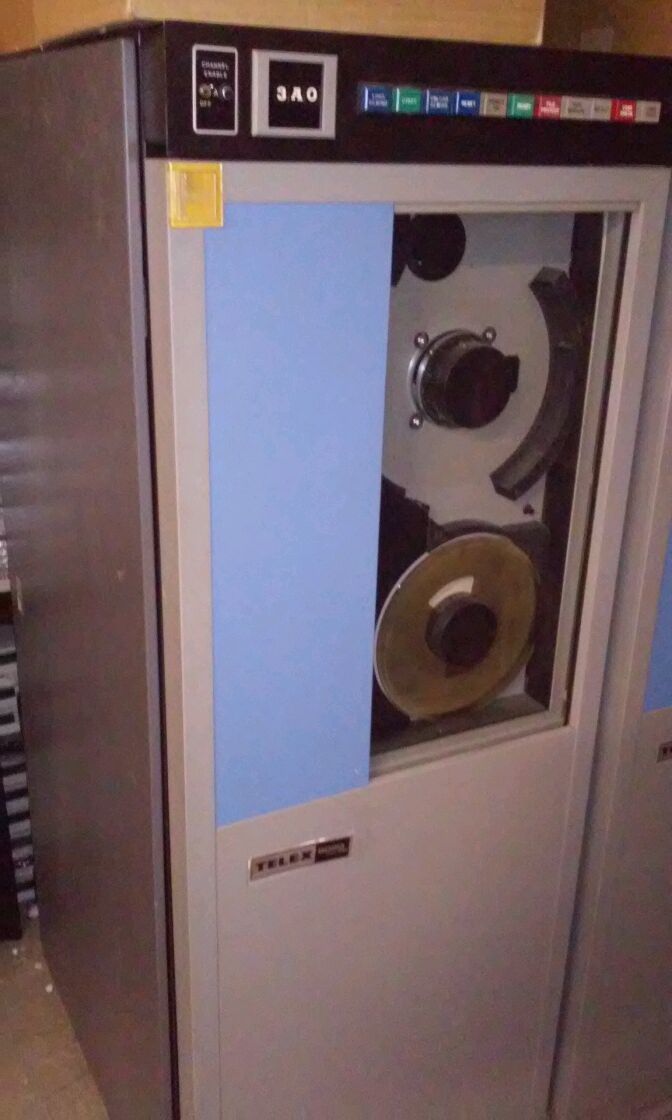
The printer was located a few hours away in Sacramento, which meant a minor road trip in a lift gate truck. When I got there, I decided to pick up two 9 track tape drives, Telex 8020 model 266 units. The first drive is in good condition and has the control unit built right in, while the second drive was damaged during shipment and has never been used. I suspect it can be restored to proper operation, but at worst case it serves as spare parts for the first drive.

One of the two tape drives I bought
My drives came with a tape tester, schematics, training manuals and other materials that will make it easier to restore them to operation. The one hiccup is that these drives require 3 phase power, which I don't have in my home. 

READING OLD CARD DECKS FOR UNIVERSITY OF MICHIGAN

A researcher at the University of Michigan contacted the Computer History Museum concerning some decks of cards that represent experiments done in 1970. They asked if the museum could help read the decks and provide files of the content, allowing researchers to include those results in new research projects.

The best way to read them was with my Documation card reader and the adapter designed by Brian Knittel that reads the cards into PC files. I moved my setup to CHM yesterday and began reading decks. 

The files consist of six boxes each having several decks of cards, but initially one of the six boxes is missing. I opened box 2 and read all 9 decks. I emailed the files and some explanation to the UofM professor and grad students to be sure they are happy with the results. It took a bit more than a half hour to process a box, thus I can finish up the other boxes on Wednesday. 

Each card deck has a header card which has MTS punched as visible characters (you can see the letters holding the card up, with each letter taking several card columns to express). It also has some other data on the card which may be identifying information such as the punch file ID when this was punched by the Michigan TimeSharing System (MTS). The following cards seem to be four-column numbers packed across each card. 
Header card
Data card